- Published on
What is VPS? Complete Guide to Virtual Private Server
- Authors

- Name
- Xiro The Dev
VPS (Virtual Private Server) is one of the most popular web hosting solutions today, especially suitable for websites and applications that need more resources than shared hosting but don't yet need a dedicated server. With the development of virtualization technology, VPS has become the top choice for many businesses and developers.
Table of Contents
What is VPS?
VPS (Virtual Private Server) is a virtual server created by dividing a physical server into multiple independent virtual servers. Each VPS has its own operating system, dedicated resources (CPU, RAM, storage capacity) and can be managed completely independently like a physical server.
Core characteristics of VPS:
| Characteristic | Description |
|---|---|
| Virtualization | Runs on a physical server but operates as an independent server |
| Private | Each VPS is isolated and doesn't affect other VPS instances |
| Full control | Root access, install any software |
| Guaranteed resources | CPU, RAM, storage are dedicated (or minimum guaranteed) |
How does VPS work?
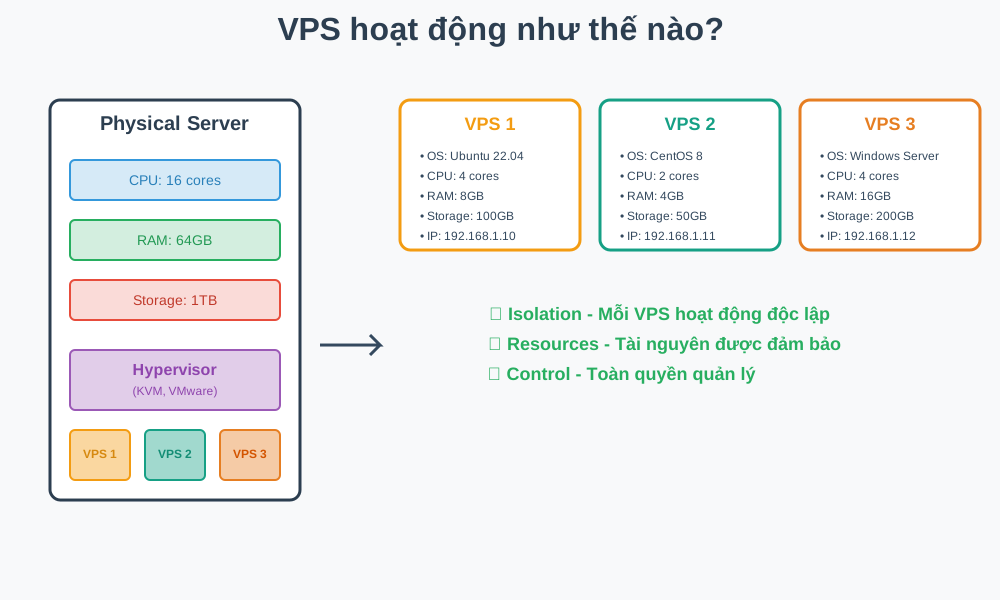
Virtualization technology is the foundation of VPS. A physical server (Physical Server) is divided into multiple virtual parts (Virtual Machines) through a virtualization layer called Hypervisor.
Operation process:
| Step | Description | Example |
|---|---|---|
| 1. Physical Server | Physical server with powerful hardware | CPU: 16 cores, RAM: 64GB, Storage: 1TB |
| 2. Hypervisor | Virtualization management software | VMware, KVM, Xen, Hyper-V |
| 3. Virtual Machines | Each VPS is an independent virtual machine | VPS 1, VPS 2, VPS 3... |
| 4. Isolation | VPS instances are separated and don't affect each other | Each VPS has its own space |
Characteristics of each VPS:
| Component | Details |
|---|---|
| Operating System | Linux (Ubuntu, CentOS, Debian) or Windows Server |
| Resources | CPU cores, RAM, Disk are dedicated |
| IP Address | Dedicated IP address |
| Space | Operates independently, doesn't share with other VPS instances |
VPS comparison with other solutions
| Feature | Shared Hosting | VPS | Dedicated Server | Cloud Server |
|---|---|---|---|---|
| Price | Cheapest | Moderate | Expensive | Moderate - Expensive |
| Resources | Shared | Guaranteed or dedicated | 100% dedicated | Guaranteed |
| Control | Limited | Full control | Full control | Full control |
| Performance | Low | Moderate - High | Highest | Flexible |
| Scalability | Very limited | Easy | Difficult | Very easy |
| Security | Depends on hosting | Good control | Good control | Good control |
| Suitable for | Small websites | Medium websites/apps | Large enterprises | Businesses of all sizes |
Detailed comparison: Shared Hosting vs VPS
| Criteria | Shared Hosting | VPS |
|---|---|---|
| Resources | Shared with many other websites | Dedicated or guaranteed |
| Price | Cheap | Moderate |
| Difficulty | Easy to use | Requires technical knowledge |
| Control | Limited installation and configuration | Full control |
| Scalability | Very limited | Can scale when needed |
| Suitable for | Personal websites, small blogs | Websites/Apps needing many resources, high traffic |
Detailed comparison: VPS vs Dedicated Server
| Criteria | VPS | Dedicated Server |
|---|---|---|
| Hardware | Shares physical server but resources are dedicated | Entire physical server |
| Performance | Moderate - High | Highest |
| Cost | Reasonable | High |
| Scalability | Easy to scale | Difficult to scale |
| Suitable for | Sufficient for most use cases | Enterprise, need extremely high performance |
Types of VPS
Based on storage type and usage purpose, VPS is divided into several types:
VPS SSD
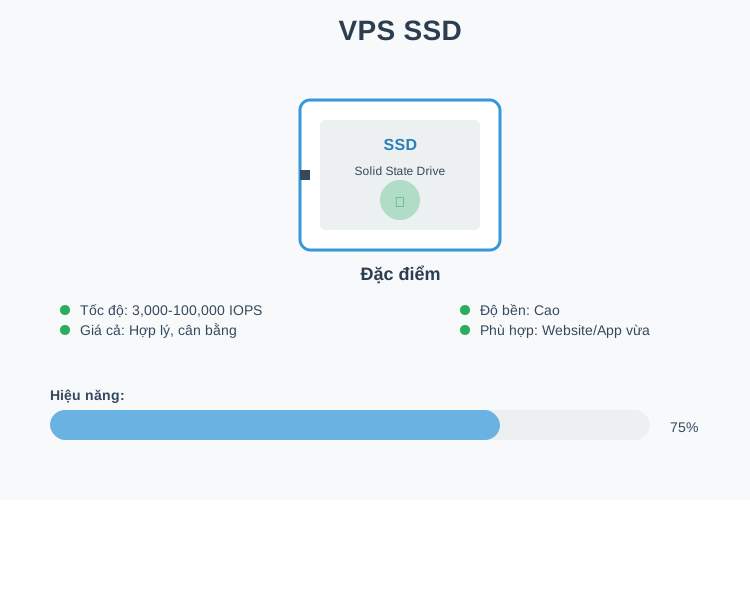
VPS SSD uses SSD (Solid State Drive) storage for data. This is the most common type of VPS with a good balance between performance and cost.
VPS NVMe
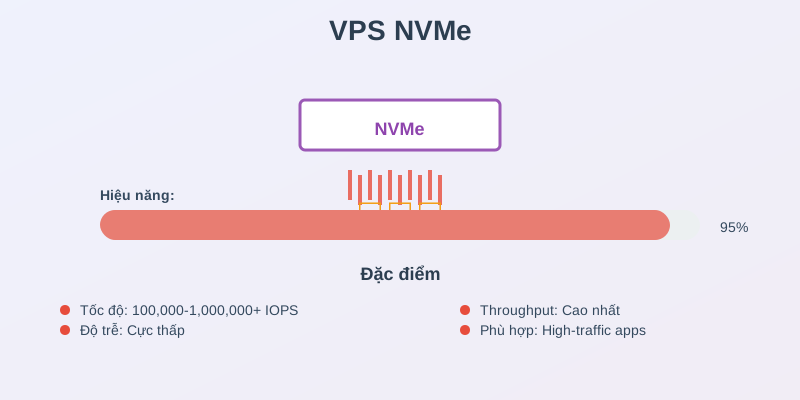
VPS NVMe uses NVMe (Non-Volatile Memory Express) storage, the latest and fastest storage technology available today.
VPS GPU
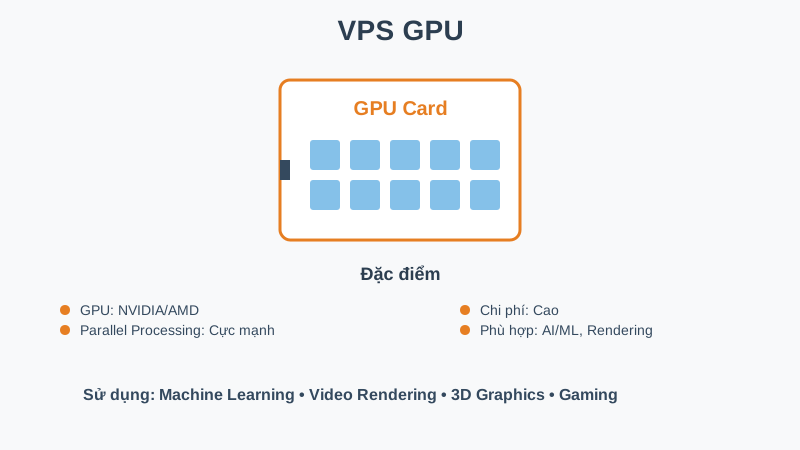
VPS GPU is a VPS equipped with GPU (Graphics Processing Unit), suitable for graphics processing, AI/ML, and rendering tasks.
Comparison table of VPS types
| VPS Type | Speed (IOPS) | Latency | Cost | Suitable for |
|---|---|---|---|---|
| VPS SSD | ~3,000-100,000 | Moderate | Reasonable | Medium websites, web applications, databases |
| VPS NVMe | ~100,000-1,000,000+ | Very low | High | High-traffic websites/apps, e-commerce, streaming |
| VPS GPU | Depends on GPU | Low | Very high | AI/ML, rendering, gaming, scientific computing |
Details of each VPS type
| Type | Characteristics | Suitable when |
|---|---|---|
| VPS SSD | • Speed: Faster than HDD (high IOPS) • Price: Reasonable • Durability: Good lifespan • Usage: Medium websites, web applications | • Need better performance than shared hosting • Limited budget but still need VPS • Website/App with moderate traffic |
| VPS NVMe | • Speed: Extremely fast (hundreds of thousands IOPS) • Latency: Very low • Throughput: Many times higher than SSD • Cost: Higher than VPS SSD | • Website/App with high traffic • Need to handle many database queries • Real-time applications requiring high speed • E-commerce, gaming, streaming |
| VPS GPU | • GPU: NVIDIA, AMD GPU • Parallel computing: Process multiple tasks simultaneously • Cost: More expensive than regular VPS • Specialized: For special use cases | • Machine Learning / AI training • Video rendering, 3D rendering • Game server with graphics processing • Cryptocurrency mining • Scientific computing |
VPS AMD vs Intel comparison
| Criteria | VPS AMD | VPS Intel |
|---|---|---|
| CPU Model | AMD EPYC (modern, powerful) | Intel Xeon (stable, popular) |
| Performance | High | Stable |
| Price | Good | Moderate |
| Compatibility | Good | Very good |
| Suitable for | Workloads needing many cores | Enterprise applications |
VPS advantages and disadvantages
Advantages summary table
| Advantage | Details |
|---|---|
| Full control | • Root/Admin access: Full control over server • Free installation: Any software, OS • Flexible configuration: Customize according to needs |
| Good performance | • Guaranteed resources: CPU, RAM not over-shared • Isolation: Not affected by "neighbors" • Stable speed: More stable performance than shared hosting |
| Reasonable cost | • Moderate price: Cheaper than dedicated server • Good ROI: Good performance/cost ratio • No hardware investment: Avoid server purchase costs |
| Scalability | • Easy upgrade: Add CPU, RAM, disk easily • Flexible: Increase/decrease resources as needed • No downtime: Upgrades usually don't cause downtime |
| Better security | • Isolation: Separated from other VPS instances • Full control: Install firewall, security tools • Custom security: Customize security according to needs |
| Reliability | • High uptime: Many providers guarantee 99.9% uptime • Easy backup: Snapshot, regular backups • Disaster recovery: Easy recovery when issues occur |
Disadvantages summary table
| Disadvantage | Details |
|---|---|
| Requires technical knowledge | • Server administration: Need to understand Linux/Windows Server • Self-management: Security, backup, updates must be done yourself • Learning curve: Initial learning time |
| Higher cost than Shared Hosting | • Higher price: Compared to shared hosting • Additional costs: May need additional services (backup, monitoring) |
| Resource Limits | • Resource limits: Still limited within VPS configuration • Overhead: Virtualization has small overhead • Not equal to dedicated: Performance not equal to dedicated server |
| Operational responsibility | • Self-management: Must handle issues yourself • Support: Depends on provider, may not support application-level • Maintenance: Must maintain system yourself |
When to use VPS?
Comparison table: Should vs Shouldn't use VPS
| Criteria | ✅ Should use VPS | ❌ Shouldn't use VPS |
|---|---|---|
| Website/App Scale | • Website/App has outgrown shared hosting • High traffic growth • Need many resources • E-commerce, Business website | • Small website, low traffic • Personal blog • Simple portfolio |
| Control and Customization | • Need full control • Install special software • Specific server configuration • Custom security requirements | • Don't need customization • Only need basic hosting • Use existing templates |
| Application Type | • Game server • API server • VPN server • Development/staging environment • Database server | • Static website • Simple landing page • Site only needs basic hosting |
| Performance | • Need good performance • Handle many transactions • Complex database • Real-time applications | • Very low traffic • Don't need many resources • Shared hosting sufficient |
| Technical Knowledge | • Have server knowledge • Want to learn server management • Know Linux/Windows Server • Familiar with command line | • No technical knowledge • Don't want to learn • Only need management via control panel |
| Budget | • Moderate to high budget • Can invest in performance • Need good ROI | • Very limited budget • Shared hosting much cheaper • Don't want to invest |
| Learning and Development | • Want to learn DevOps • Testing and development • Learn server management • Experiment with new technologies | • Only need operation • Don't want to learn • Need "plug and play" solution |
| Scalability | • Need flexible scaling • Traffic varies greatly • Have growth plans | • Stable, low traffic • Don't need scaling • Fixed website |
| Better Alternative | • Upgrading from shared hosting • Need more than shared hosting • Don't yet need dedicated server | • Shared hosting sufficient • Or may need dedicated server if extremely high performance needed |
Quick decision: Self-assessment checklist
Please answer the following questions to determine if VPS is right for you:
Does your Website/App have high traffic or growing traffic?
Do you need full server control (root access)?
Do you have Linux/Windows Server knowledge or willing to learn?
Do you need to install special software or custom configuration?
Does your budget allow $10-50/month?
Has shared hosting stopped meeting your needs?
Do you need better performance than shared hosting?
Is your Website/App e-commerce or business critical?
Do you need development/staging environment?
Is your website very small, just a personal blog/portfolio?
common.vpsChecker.questions.no-learning
common.vpsChecker.questions.low-budget
Please answer the questions to get a recommendation
Answered: 0/12 questions
How to evaluate:
- Total score ≥ 5: ✅ Should choose VPS - VPS fits your needs
- Total score 2-4: ⚠️ Consider - Can start with shared hosting or low-config VPS
- Total score < 2: ❌ Don't need VPS yet - Shared hosting will be more suitable
Simple decision flowchart:
Start
  ↓
Has your Website/App outgrown shared hosting?
  ├─ YES → Do you have server management knowledge?
  │        ├─ YES → Does budget allow?
  │        │        ├─ YES → ✅ Choose VPS
  │        │        └─ NO → ⚠️ Consider shared hosting
  │        └─ NO → Ready to learn?
  │                   ├─ YES → ✅ Choose VPS (Managed VPS)
  │                   └─ NO → ❌ Choose Shared Hosting
  └─ NO → Need high control?
             ├─ YES → ✅ Choose VPS
             └─ NO → ❌ Choose Shared Hosting
Quick conclusion: Comparison table
| Level | Conditions | Action | Alternative solutions |
|---|---|---|---|
| ✅ Choose VPS now | • Website/App has outgrown shared hosting • Have server management knowledge • Need full control • Need to install special software • Building game/API server • Budget $10-50/month • Need good performance | Should choose VPS - VPS fits your needs | • Unmanaged VPS for full control • Managed VPS if need support |
| ⚠️ Consider VPS | • Website is growing • Haven't outgrown shared hosting • Have budget but little experience • Want to learn server management • Ready to invest time learning | Can choose VPS - Start with low configuration | • Shared hosting if not ready • Managed VPS for support • Low-config VPS to learn |
| ❌ Don't need VPS yet | • Small website, low traffic • No technical knowledge • Don't want to learn about servers • Very limited budget (under $5/month) • Only need basic hosting • Personal blog/Portfolio | Shouldn't choose VPS yet - Shared hosting sufficient | • Shared Hosting - Most suitable • Free hosting for personal blog • WordPress.com, Blogger |
Important VPS features
Features summary table
| Component | Details |
|---|---|
| CPU (Central Processing Unit) | • Number of guaranteed cores • CPU model and speed • Burst capacity (if available) |
| RAM (Random Access Memory) | • RAM capacity • Type: DDR4, DDR5 • Swap memory |
| Storage | • Hard drive capacity • Type: SSD, NVMe, HDD • IOPS (Input/Output Operations Per Second) |
| Bandwidth | • Monthly bandwidth • Port speed • Unmetered or limited |
| Control Panel | • cPanel, Plesk, DirectAdmin • Or command line (SSH) • Manage via web interface or terminal |
| Root Access | • Full administrative access • Install any software • Full system control |
| Snapshot and Backup | • Automatic backup • Snapshot before changes • Quick recovery • Version control for server |
| IP Address | • Dedicated IP • IPv4 and IPv6 • Multiple IPs (if needed) • Static IP that doesn't change |
| Firewall | • Built-in firewall • Custom firewall rules • DDoS protection • Port filtering and security rules |
| SSL Certificate | • Free SSL (Let's Encrypt) • Paid SSL • Auto-renewal • HTTPS security for website |
| Monitoring | • Resource usage monitoring (CPU, RAM, Disk) • Uptime monitoring • Alert notifications • Performance metrics and analytics |
| Support | • 24/7 support • Response time • Support channels (ticket, chat, phone) • Technical assistance when needed |
Classification by group:
1. Resources:
- CPU, RAM, Storage, Bandwidth - Basic hardware and network components
2. Management and Control:
- Control Panel, Root Access, Snapshot and Backup - Server management tools
3. Network and Security:
- IP Address, Firewall, SSL Certificate - Security and network connectivity
4. Monitoring and Support:
- Monitoring, Support - Tracking and support
How to choose the right VPS
1. Assess needs
Traffic and Users:
- Number of daily visitors
- Peak traffic
- Concurrent users
Application:
- Type of website/application
- Database size
- File storage needs
Future:
- Growth projection
- Scalability needs
2. Choose configuration
| Component | Small website | Medium website | Large application |
|---|---|---|---|
| RAM | 1-2GB | 4-8GB | 16GB+ |
| CPU | 1-2 cores | 2-4 cores | 4+ cores |
| Storage | 20-40GB | 40-100GB | 100GB+ |
| Bandwidth | 100-200GB | 200-500GB | 500GB+ |
3. Choose VPS type
| VPS Type | Characteristics | When to choose |
|---|---|---|
| VPS SSD | Balance of price and performance | Suitable for most use cases |
| VPS NVMe | Highest speed | Need extremely high speed |
| VPS GPU | GPU processing | Need graphics processing, AI/ML |
4. Choose provider
| Criteria | Description | Importance level |
|---|---|---|
| Uptime guarantee | Guarantee 99.9%+ uptime | ⭐⭐⭐⭐⭐ Very important |
| Support quality | Customer support quality | ⭐⭐⭐⭐⭐ Very important |
| Pricing | Transparent, clear pricing | ⭐⭐⭐⭐ Important |
| Data center location | Data center location near users | ⭐⭐⭐⭐ Important |
| Backup and disaster recovery | Backup and recovery solutions | ⭐⭐⭐⭐ Important |
| Reviews and reputation | Reviews and reputation | ⭐⭐⭐⭐ Important |
| Pricing model | Monthly, annual payment options | ⭐⭐⭐ Moderate |
| Money-back guarantee | Refund policy | ⭐⭐⭐ Moderate |
| Migration support | Support migrating from other hosting | ⭐⭐⭐ Moderate |
| Documentation | Quality documentation | ⭐⭐⭐ Moderate |
VPS management and security
Summary table: VPS Management and Security
| Area | Tasks | Tools/Solutions |
|---|---|---|
| Firewall Security | • Only open necessary ports • Block unnecessary ports • Rate limiting | iptables, ufw, firewalld |
| SSH Security | • Disable root login • Use SSH keys • Change default port • Fail2ban | SSH keys, fail2ban |
| Updates | • Regular system updates • Security patches • Package updates | apt/yum update, unattended-upgrades |
| User Management | • Create separate users • Use sudo properly • Strong passwords | useradd, sudoers |
| Resource Monitoring | • CPU usage • RAM usage • Disk I/O • Network traffic | htop, top (Linux), Task Manager (Windows) |
| Monitoring Tools | Advanced monitoring | Prometheus, Grafana, Zabbix |
| Alerts | • Set up alerts for high usage • Email/SMS notifications • Auto-scaling triggers | Email alerts, SMS gateways, CloudWatch |
| Regular Backups | • Daily/weekly backups • Automated backup scripts • Off-site backups | Cron jobs, rsync, cloud storage |
| Backup Types | • Full backup • Incremental backup • Database backup • File backup | tar, rsync, mysqldump, pg_dump |
| Disaster Recovery | • Test restore process • Document recovery steps • Keep multiple backup copies | Backup scripts, documentation |
| Web Server Optimization | • Nginx/Apache optimization • Caching (Redis, Memcached) • CDN integration | Nginx, Apache, Redis, CloudFlare |
| Database Optimization | • MySQL/PostgreSQL tuning • Index optimization • Query optimization | MySQL tuning, PostgreSQL config |
| Application Optimization | • Code optimization • Caching strategies • Load balancing | Code review, Redis, HAProxy |
Best Practices Checklist
| Practice | Description | Frequency |
|---|---|---|
| Keep system updated | Update system and packages | Weekly/Monthly |
| Regular backups | Regular data backups | Daily/Weekly |
| Monitor resources | Track resource usage | Continuous |
| Use strong passwords | Strong passwords for all accounts | On setup |
| Enable firewall | Enable and configure firewall | On setup |
| Log management | Manage and analyze logs | Continuous |
| Security audits | Regular security checks | Monthly |
| Document configurations | Record system configurations | On changes |
Practical application: Deploy Applications to VPS
After understanding VPS, you can apply it in practice by deploying your applications. We have detailed guides:
Deploy Next.js to VPS
See detailed guide on how to deploy Next.js to VPS using Docker, PostgreSQL and Nginx - a popular and production-ready stack.
Deploy PHP to VPS
See detailed guide on how to deploy PHP to VPS using Docker, MySQL and Nginx with simple PHP example.
What you will learn:
- Setup and configure VPS from scratch
- Deploy applications with Docker
- Configure Nginx as reverse proxy
- Setup database (PostgreSQL or MySQL)
- Configure SSL with Let's Encrypt
- Best practices for production deployment
Conclusion
VPS is a powerful and flexible hosting solution, suitable for many needs from medium websites to enterprise applications. With full control, good performance and reasonable cost, VPS has become a popular choice for many developers and businesses.
Key points
- ✅ VPS = Virtual Private Server - Virtual private server
- ✅ Full control - Root access, free installation
- ✅ Good performance - Guaranteed resources, stable performance
- ✅ Flexible - Easy to scale, suitable for many use cases
- ✅ Reasonable cost - Balance between price and performance
Comparison table: Choose the right solution
| Solution | Characteristics | Suitable when |
|---|---|---|
| Shared Hosting | Small website, low traffic, don't need control | Personal blog, simple portfolio |
| VPS | Medium-large website/app, need control, have technical knowledge | Growing website/app, need customization |
| Dedicated Server | Enterprise, need maximum performance, large budget | Large enterprise, extremely high traffic |
| Cloud Server | Need high scalability, microservices, modern applications | Modern apps, microservices, auto-scaling |
Next steps: Checklist
| Step | Action | Details |
|---|---|---|
| 1. Assess needs | Determine requirements | Traffic, application, budget |
| 2. Choose configuration | Choose suitable resources | RAM, CPU, Storage |
| 3. Choose provider | Research and compare | Reviews, support, pricing |
| 4. Setup and Secure | Configure basic security | Firewall, SSH, updates |
| 5. Deploy Application | Deploy application to VPS | See Next.js deployment guide |
| 6. Monitor and Optimize | Track and optimize performance | Monitoring, optimization |
TIP
Start small: If you're new to VPS, start with a small configuration and scale up when needed. This helps you learn and avoid wasting resources initially.