- Published on
Vector Database: Understanding Vector Databases
- Authors

- Name
- Xiro The Dev
Vector Database is one of the most important technologies in the current AI era. From ChatGPT to Netflix's recommendation systems, vector databases are the foundation for many modern AI applications. In this article, we'll explore vector databases in detail and in an easy-to-understand way.
Table of Contents
What is a Vector Database?
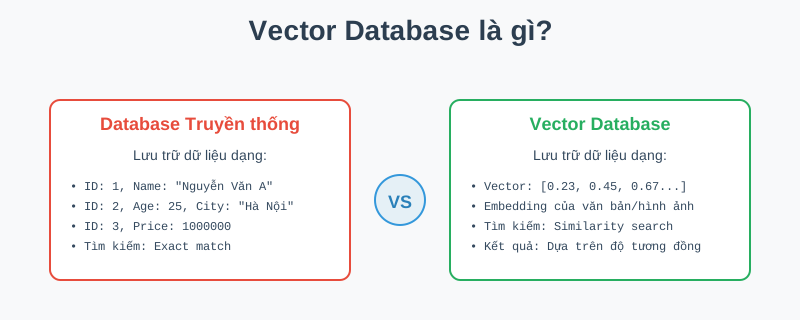
A Vector Database (also called Vector Store) is a specialized type of database designed to store, manage, and search vector data (embeddings). Unlike traditional databases that store data as numbers, strings, or booleans, vector databases work with multi-dimensional numerical arrays representing object embeddings.
Core differences
Traditional Database:
- Storage:
ID: 1, Name: "John Doe", Age: 25 - Search: Exact match - only finds when values match exactly
- Example: Searching
name = carwon't findxe hơiorô tô
Vector Database:
- Storage: Vector embeddings like
[0.23, -0.45, 0.67, ..., 0.12](typically 384-1536 dimensions) - Search: Similarity search - finds based on semantic similarity
- Example: Searching
xe hơican returnô tô,xe cộ,automobilebased on meaning
What is an Embedding?
An embedding is a way to represent complex data (text, images, audio) as numerical vectors in multi-dimensional space. Objects with similar meanings will have vectors close to each other in this space.
- Text: "Car" and "Automobile" → vectors close together
- Images: Cat photo and cat image → vectors close together
- Audio: Same person's voice → vectors close together
How does a Vector Database work?
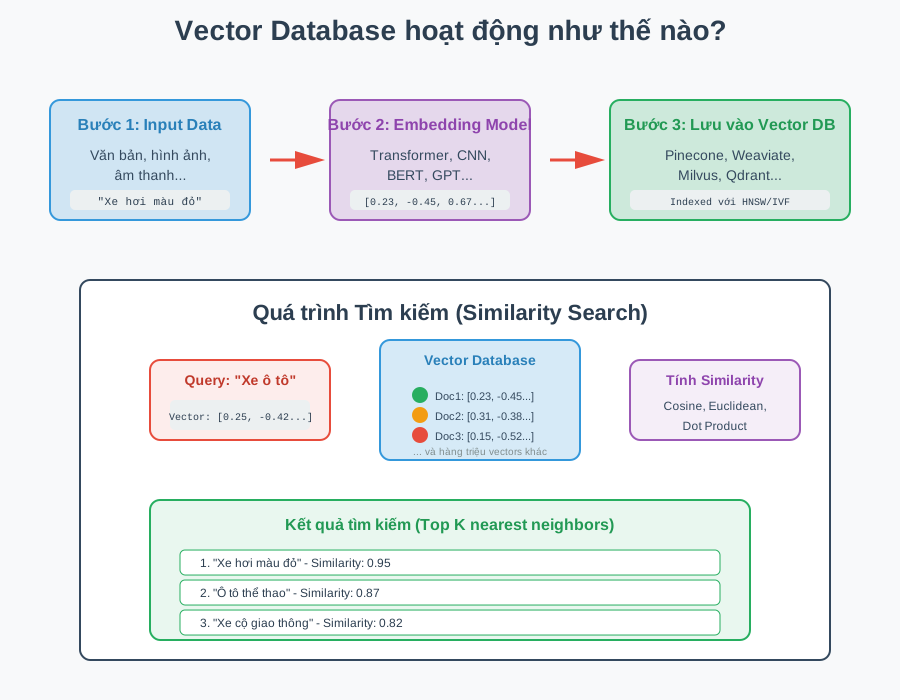
Working with a Vector Database involves 3 main steps:
Step 1: Create Embedding
Input data (text, images, audio) is converted into vectors using embedding models:
- Text: BERT, GPT embeddings, sentence-transformers
- Images: ResNet, CLIP, Vision Transformers
- Audio: Wav2Vec, Whisper embeddings
Example:
Input: "Red car"
↓ Embedding Model (BERT)
Output: [0.23, -0.45, 0.67, 0.12, ..., -0.34] (768 dimensions)
Step 2: Store in Vector Database
Vectors are stored and indexed using special algorithms to optimize search speed:
- HNSW (Hierarchical Navigable Small World): Hierarchical graph, fast search
- IVF (Inverted File Index): Divides space into clusters
- LSH (Locality Sensitive Hashing): Hash functions to group similar vectors
Step 3: Similarity Search
When a query is made, the system will:
- Convert query to vector: Query text/image → embedding vector
- Calculate similarity: Compare query vector with all vectors in database
- Return Top-K results: Vectors with highest similarity
Similarity calculation methods:
- Cosine Similarity: Measures angle between 2 vectors (most common)
- Euclidean Distance: Euclidean distance
- Dot Product: Dot product
Example:
Query: "Car"
↓
Top 3 Results:
1. "Red car" - Similarity: 0.95
2. "Sports car" - Similarity: 0.87
3. "Traffic vehicle" - Similarity: 0.82
Why do we need Vector Databases?
Comparison with Traditional Databases
| Feature | Traditional Database | Vector Database |
|---|---|---|
| Data type | Numbers, strings, boolean | Vectors (embeddings) |
| Search method | Exact match | Similarity search |
| Example Query | SELECT * WHERE name = "car" | Find vectors closest to query vector |
| Use Cases | E-commerce, CRM, Financial records | Semantic search, RAG, Recommendation, AI apps |
| Limitations | ❌ Doesn't understand semantics ❌ Can't find xe hơi when searching ô tô | ✅ Understands semantics ✅ Finds semantically related results |
1. Semantic Search
Traditional databases don't understand meaning. If you search for car, it won't find xe hơi or automobile. Vector databases solve this by searching based on meaning.
Real-world examples:
- Search
today's weather→ Findscurrent climate,today's temperature - Search
black cat photo→ Finds all black cat photos even with different captions
2. Performance for AI/ML
Vector databases are specially optimized for similarity search:
- Can search through millions to billions of vectors in milliseconds
- Traditional databases would be very slow when comparing each vector with the query
3. Multi-modal Support
A vector database can store embeddings from different types of data:
- Text, images, audio in the same vector space
- Cross-modal search: Find images with text query, find text with image query
4. Foundation for AI Applications
Many modern AI applications depend on vector databases:
- RAG (Retrieval-Augmented Generation): ChatGPT with knowledge base
- Recommendation Systems: Netflix, Amazon, Spotify
- Anomaly Detection: Fraud detection, anomaly detection
- Semantic Search: Enterprise search, document retrieval
Where are Vector Databases used?
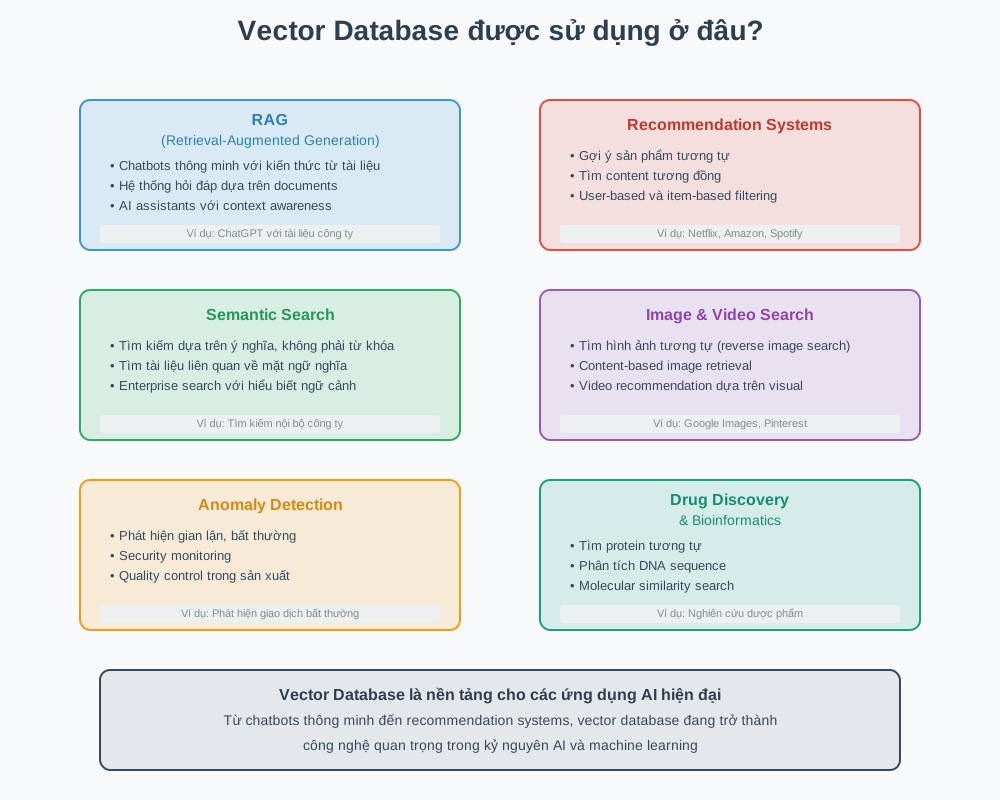
1. 🤖 RAG (Retrieval-Augmented Generation)
RAG allows LLMs to access knowledge from external documents:
- Intelligent chatbots with their own knowledge base
- Q&A systems based on company documents
- AI assistants that can answer about the latest information
Example: ChatGPT Enterprise can answer about internal company documents
2. 🎯 Recommendation Systems
Recommend products and content based on similarity:
- Product recommendations: Amazon recommends similar products
- Content recommendations: Netflix recommends movies, Spotify recommends music
- User-based filtering: Find users with similar preferences
3. 🔍 Semantic Search
Search based on meaning rather than keywords:
- Enterprise search: Find internal company documents
- E-commerce search: Find products using natural language descriptions
- Document retrieval: Find semantically related text
4. 🖼️ Image & Video Search
Search images/videos based on content:
- Reverse image search: Google Images, TinEye
- Visual similarity: Pinterest "More like this"
- Content-based retrieval: Find videos with similar scenes
5. ⚠️ Anomaly Detection
Detect abnormal patterns:
- Fraud detection: Detect fraudulent transactions
- Security monitoring: Detect unusual intrusions
- Quality control: Detect defective products in manufacturing
6. 💊 Drug Discovery & Bioinformatics
Scientific research with similarity search:
- Find similar proteins
- Analyze DNA sequence similarity
- Molecular similarity search in drug development
Popular Vector Databases
1. Pinecone
- Cloud-native, fully managed
- Easy to use, has free tier
- Good for prototyping and production
2. Weaviate
- Open-source, self-hosted
- Supports many integrated vectorizers
- GraphQL API
3. Milvus
- Open-source, high performance
- Supports distributed deployment
- Widely used in production
4. Qdrant
- Open-source, written in Rust
- Fast and memory-efficient
- Good documentation
5. Chroma
- Lightweight, simple API
- Good for local development
- Python-first
6. PGvector (PostgreSQL extension)
- Extension for PostgreSQL
- Leverages PostgreSQL ecosystem
- Suitable when you already have PostgreSQL
Conclusion
Vector Databases are becoming foundational technology for modern AI applications. With the ability to search based on semantics and efficiently process millions of vectors, vector databases open up new possibilities in:
- Semantic search and intelligent retrieval
- AI-powered applications (RAG, chatbots)
- Recommendation systems
- Multi-modal AI applications
As AI and machine learning continue to evolve, understanding and using vector databases will become increasingly important. Whether you're a developer wanting to build AI applications, or simply want to understand the technology shaping the future, vector databases are a topic worth exploring.
TIP
Next steps: Experiment with a vector database like Pinecone or Milvus to better understand how they work in practice. Start with a small project like semantic search for your documents!